It's a convincing moment. You sign the contract, roll the AI out, and watch your dispatchers stop using it inside the first month. The reason is always the same: the AI was reading the words on the ticket and nothing else around it. It couldn't see that the client was 60 days past due, that the work being requested was out of scope, or that the account had already been credited twice for the same issue. Every recommendation it surfaced was confident, and several of them were wrong.
That's the gap between two kinds of AI PSAs. One was built on a platform that already sees the whole business. The other has a language model bolted to the side of a service desk. Both demo well in the room. Only one of them holds up once it's running every day on real accounts.
This post walks through what the difference looks like in practice, the four things bolted-on AI is structurally blind to, and the five questions that will surface the architecture in any vendor conversation.
Why "Built-In or Bolted-On" Is the Right Question About Your AI PSA
PSA vendors are announcing AI features faster than they can integrate them. The chat panel that summarized your ticket in the demo might be a deeply integrated piece of the platform, or it might be OpenAI dropped into a sidebar with a logo on top. From the demo seat, you can't tell.
There are four things worth keeping in mind before you sit through another vendor's AI demo:
- Every vendor has an AI story right now. Acquisitions, partnerships, and chatbot wrappers are the fastest paths to an AI announcement, and most PSA vendors have taken at least one of them in the last 18 months. What's on the screen is rarely what the platform was actually built to support.
- In a 30-minute demo, the good and bad versions look identical. Both open a chat panel, both summarize a ticket, both surface a recommendation that sounds sharp. The architecture underneath is the only thing that decides whether the AI is still doing useful work two months after the rollout.
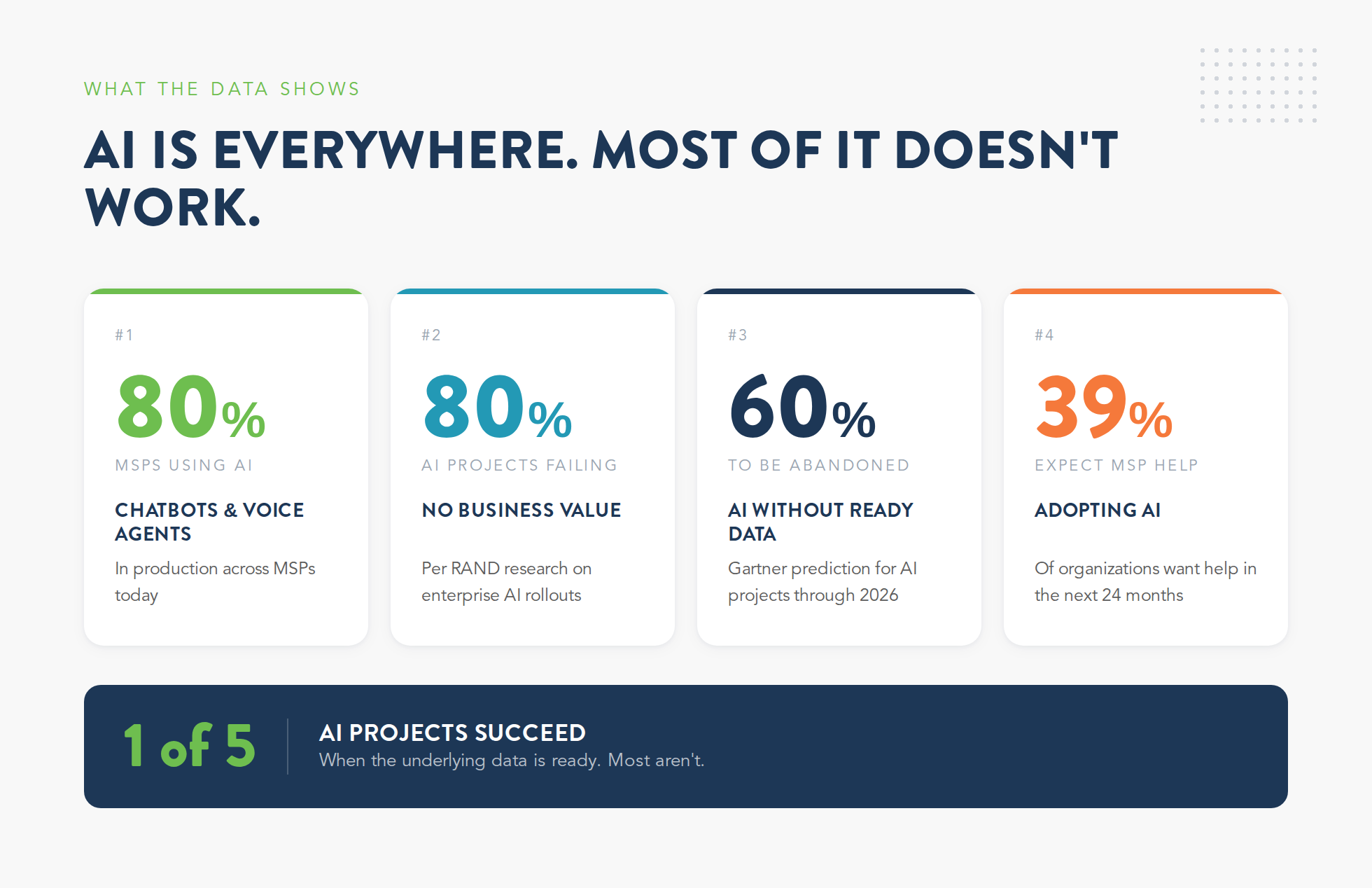
- Your customers are already pulling AI through your business. 80% of MSPs are running AI chatbots or voice agents in production, and 39% of organizations now expect their MSP to help them adopt AI in the next two years. The demand is real and the spend is going somewhere, whether the AI inside your PSA is helping you keep up with it or not.
- Most AI projects fail because of the data underneath them. 80.3% of AI projects fail to deliver business value per RAND, and Gartner expects 60% of AI projects without AI-ready data to be abandoned by the end of 2026. Both studies trace the failures back to the same root cause: AI only works as well as the data architecture underneath it can support.
That's the bolted-on problem stated plainly. The fastest way to spot it in any vendor demo is to look at what the AI is actually allowed to see.
4 Things Bolted-On AI Can't See in Your Business
Most of what PSA vendors are calling AI right now is a chat panel reading the ticket on your dispatcher's screen and writing back a response. That works in a 30-minute demo because a single ticket has everything the AI needs to look smart. The problem shows up in production, when your team starts running it against real accounts.
The AI is making recommendations on what's in the ticket text and nothing else. Billing status, contract terms, payment history, and broader account context all sit in systems the AI has no connection to. That leaves your team with two choices: second-guess every recommendation, or trust the AI and pass the mistakes downstream to finance, ops, and the account managers who have to clean them up.
The same four blind spots come up at every MSP running these tools day to day:
1. Your Client's Billing History
The AI on your dispatcher's screen reads the ticket and writes the response. It doesn't see the rest of the account: whether the client is 60 days past due, whether finance has already issued two service credits this quarter, or whether the account is over its contracted hours for the month. Without that context, what looks like a smart recommendation in the demo turns into a problem your back office has to clean up:
- A suggested reply goes out without flagging that the client is already in collections
- An urgent prioritization gets applied to an account on a finance-managed payment plan
- A courtesy discount gets recommended for a client who already received one two weeks ago
The AI states each one with the same confidence as the recommendations that are actually correct. By the time finance catches the mistake, it's usually already in someone's inbox.
2. Your Contract Terms and SLA Scope
The AI knows the ticket type. The problem is, the contract behind that ticket lives on a different system in your back office, and none of it is visible to the AI when it generates a response. So the response gets written without scope checks or SLA verification, with no awareness of what the client actually signed for. Your billing team is usually the first to catch what went wrong:
- Out-of-scope work gets implicitly committed in a draft the AI suggested
- High-priority routing fires for a client whose SLA doesn't actually call for it
- A remediation gets recommended that the contract specifically excludes
A longer prompt doesn't fix this. You can't prompt the AI past data it has no connection to.
3. Your Payment Status and Credit History
Payment behavior is some of the most useful context an AI can work with. But bolted-on AI doesn't have access to any of it. Late payments, repeated service credits, and accounts your finance team is preparing to churn all live in the billing system, which the chatbot has no connection to. So the workflow runs as if every account is in good standing, which is exactly when things slip:
- Renewal recommendations get drafted for clients finance is already preparing to churn
- Service expansions get suggested to accounts on credit hold
- Free hours or courtesy work get approved on accounts that should require finance sign-off first
Sure, the model can do plenty of useful work when it has the data. The piece missing here is the financial context that would let the recommendation reflect where the account actually stands.
4. The Client's Full Activity Across Your Business
Every ticket is one moment in an ongoing client relationship. Behind it sits the previous 30 tickets, the open project work, the notes from last quarter's QBR, the renewal scheduled for next quarter, and the patterns running across all of it. Bolted-on AI sees none of that context. It works off the current ticket and walks into the same problems again and again:
- Repeat issues look like one-offs because nothing connects them across the account's history
- Account-level patterns go unrecognized, even when the data exists somewhere in your stack
- Recommendations get surfaced that contradict what was decided in the last conversation, because the AI never saw it
For an AI to actually reason across an account instead of one ticket at a time, ticketing, billing, contracts, and service activity all have to live in the same database the AI is querying. Without that, you're back to a chatbot with a confident voice and a narrow view.
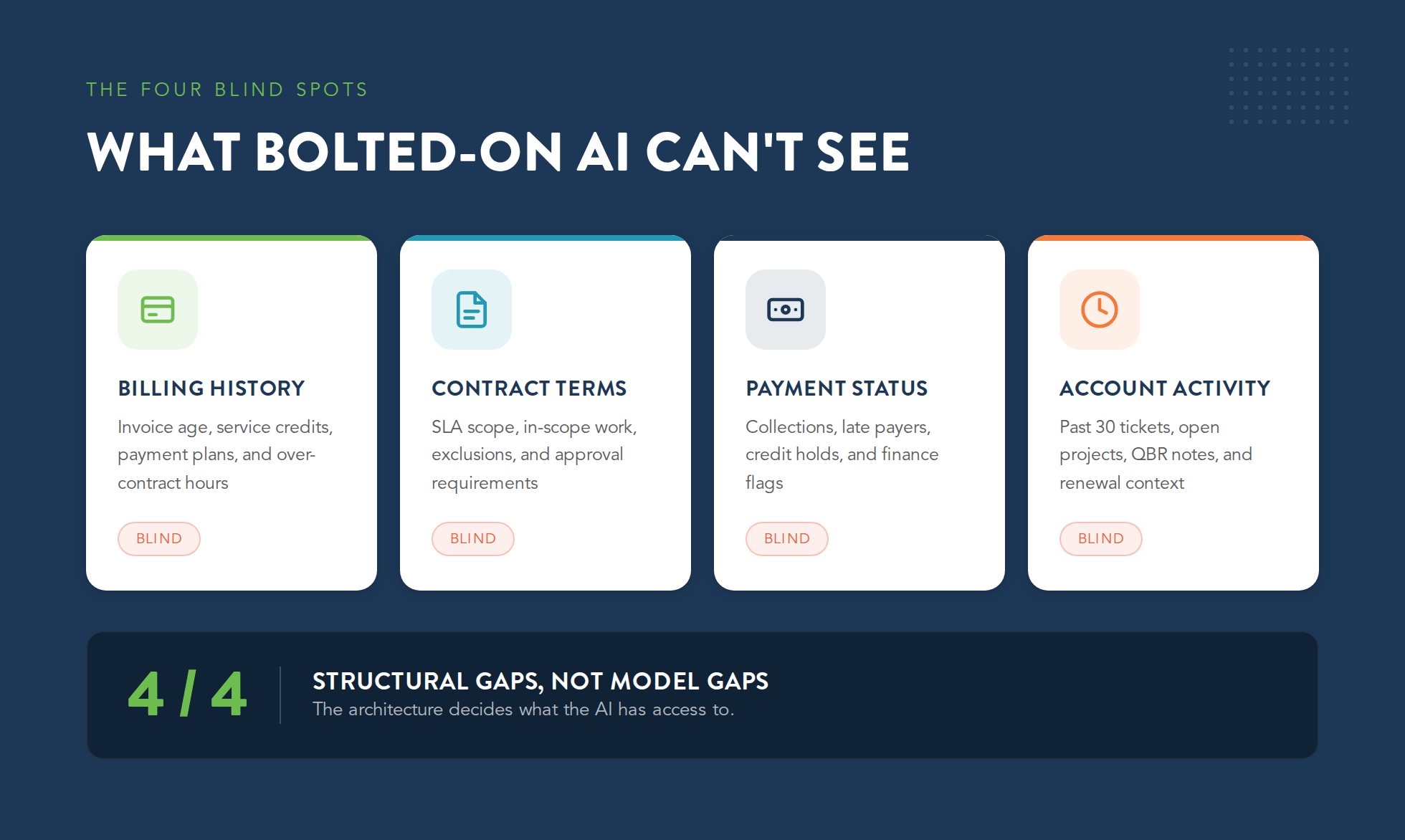
This is what people mean when they say AI needs the right data underneath it. The model itself is usually capable enough. What decides whether the AI is actually useful is how much of the business it's connected to, and most of the AI in PSA demos right now is connected to very little.
What a Built-In AI PSA Actually Looks Like in Practice
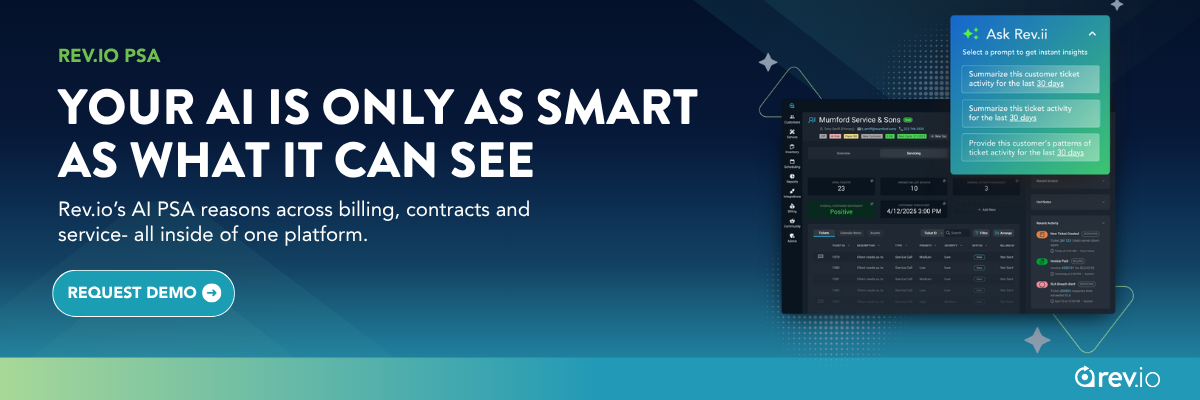
Built-in AI sits on top of operational data the platform was already managing day to day. Tickets, contracts, billing, payments, RMM activity, time entries, and client history all live in the same database, and the AI reads from all of it. Every recommendation it surfaces is informed by what's happening across the whole account.
In practice, the difference plays out the moment a new ticket hits your dispatcher's queue. A bolted-on tool would read the ticket and suggest a reply. A built-in AI reads the same ticket and the rest of the account behind it.
What it sees on every ticket:
- Recent client activity. The same client has filed four tickets this week, and the AI flags the pattern
- The active contract. The work being requested isn't covered under the current SLA
- The renewal calendar. The account is up for renewal in 60 days
What that context lets it do:
- Routes the response through an approval workflow
- Logs the billable time against the right code
- Updates contract utilization automatically
- Queues a follow-up for the account manager whose renewal is 60 days out
The work starts in the same place on both platforms. The built-in AI just covers more ground from there. MSPs running on this kind of architecture describe it the same way: the AI finally has the context it needs for recommendations that hold up after a dispatcher reviews them. The output reflects the full account behind every ticket it touches.
5 Questions to Ask Any AI PSA Vendor Before You Sign
PSA vendor demos are choreographed to look polished. A chat panel opens, summarizes a ticket cleanly, and surfaces a smart-sounding recommendation. None of that tells you what you actually need to know: whether the platform has the architecture to keep that performance going on real accounts, or whether you're looking at a chatbot wrapper that breaks the first month of production use.
These five questions cut past the demo to what the AI is actually built on. Most of them surface the architecture in under a minute, and almost none of them can be answered well when the AI is bolted on.
1. What Data Does the AI Have Access to When It Makes a Recommendation?
If the vendor's answer stops at ticket content, the AI is reading the screen and nothing else. If the answer includes billing, contracts, payment status, and client history, there's real integration depth behind the demo. Push on the answer until you know which one you're dealing with:
- Listen for whether the AI can read across modules or only inside the one it's embedded in
- Ask which specific tables, records, or modules the AI is allowed to query
- Push for an example, live in the demo, where the AI surfaced a recommendation that referenced a non-ticket data point
If the demo can't produce that example in real time, you've got your answer.
2. Did Your Team Build This AI, or Did You Acquire It?
Acquired AI can work, but it takes the longest to feel integrated. Vendors are rarely upfront about which bucket their AI falls into unless you ask directly, which is why this is one of the most useful questions in a vendor conversation:
- AI built in-house was designed against the platform's data model and extends naturally as the platform evolves
- Plugged-in AI carries the same handoff and integration risk as any third-party tool already in your stack
- Acquired AI sits in between, and how well it actually works depends on how much rebuilding the acquirer is willing to invest in
The vendor's answer here tells you a lot about what their next 18 months actually look like.
3. Can the AI Trigger Actions Across Billing and Service Delivery, or Just Suggest Replies?
Bolted-on AI reads a ticket and suggests a response. A built-in AI handles that suggestion as one step inside a longer chain, closing the ticket, logging the billable time against the right code, kicking off the invoice line, updating contract utilization, and flagging the work for approval when the contract requires it. The whole sequence runs from a single action. That's what you're looking for in the demo:
- Ask the vendor to walk through the full chain of action, not just the suggestion step
- Watch for the moment the AI hands work off to a human to go do the next step in another system
- Real AI PSA workflows close the loop end to end without anyone copying and pasting between tools
If the demo stops at "here's a draft reply," the AI is helping your team draft responses faster without changing what happens underneath. That's a productivity gain on its own, but it falls short of what AI inside a PSA should actually be doing.
4. What Happens to the AI's Usefulness if I Keep My Current Billing Tool?
This question identifies whether the AI is integrated with billing or just adjacent to it. If billing lives in a separate system, the AI is blind to revenue context regardless of how many integrations show up on the website. Listen carefully to how the vendor answers it:
- Some will downplay the gap and claim integrations cover it
- Integrations move data between systems; they don't extend the AI's reasoning across them
- The strongest answer is the one that admits the AI works best when billing lives in the same platform
If the vendor hesitates on this one, you've already learned something useful about how their AI actually works.
5. What's on Your AI Roadmap for the Next 12 Months, and Is Your Team Building It?
This one is about the trajectory of the architecture. A vendor whose AI roadmap is mostly integrations and partnerships is going to look very different in two years from a vendor whose roadmap is mostly internal builds on a platform designed for them from the start. ConnectWise acquired zofiQ in January 2026 specifically to add agentic AI to its PSA workflows. That's the bolted-on path at industrial scale:
- An acquired AI is a separate codebase being grafted onto an existing platform
- The integration work to make it feel native takes years
- Platforms designed for AI from the start aren't doing that work, because the underlying architecture already supports the AI being added on top
This is also the question where the vendor's answer tells you how fast they're going to ship anything new off the platform after the AI announcement.
Why Your AI PSA Vendor's Dev Team Matters More Than Their AI Demo
Most of the big AI announcements in the PSA space right now are acquisitions, not internal launches. Vendors whose platforms weren't built to ship AI natively are buying companies that can, then trying to integrate the result on top of the platform they already had. ConnectWise's zofiQ deal is the biggest recent example, and more are coming.
The Bolted-On Pattern at the Company Level
A platform built before AI was a serious capability has to acquire the capability, integrate it across a codebase that wasn't designed for it, and then convince the market the result is the same as having built it in from the start. The data architecture, the workflows, and the team's instincts all have to be retrofitted. The retrofit takes years.
How Rev.io Is Built Differently
The platform was rebuilt with an AI-native architecture before the AI features started shipping, so the data model, the workflows, and the dev team were set up for AI work when it began rather than after. In February 2026, Rev.io named a Chief AI Officer, Josh Owen, with a mandate that's still uncommon in this space: embed AI into Rev.io's own operations first, then productize what works into the platform for MSP and CSP customers. The internal dev team uses AI tooling daily to ship features faster than competitors still working through integration debt on the tools they bought last year.
Three things change when AI is built into the platform from the start:
- AI gets proven internally before it ships. Every feature is tested inside Rev.io's own operations before customers see it in the product.
- Features ship faster. The dev team uses AI daily to compress release cycles, which means customers see new capabilities sooner.
- Internal wins become customer features. Every efficiency Rev.io builds for itself becomes a capability available to MSP and CSP customers downstream.
The legacy pattern runs in reverse. Features ship to hit the marketing announcement, then stall the first time a customer asks them to do something the underlying platform wasn't built to support.
For MSPs evaluating PSA platforms right now, the dev team story tells you more about the next two years of the product than any feature comparison ever will. Vendors still acquiring AI are going to spend the next two years integrating what they bought. Vendors that built AI into the platform from the start are spending those same two years shipping new features off the same foundation.
Conclusion: The Vendors With Built-In AI Are Compounding Their Lead
The MSPs getting the most out of AI over the next five years are going to be the ones whose platforms can see the whole business when the AI is reasoning. A PSA that can't see billing data has no way to factor revenue into its recommendations. A billing platform that can't see tickets has no way to factor service risk into renewal conversations. Bolted-on tools will keep adding features to the surface, but the gap between confident-sounding recommendations and actually useful ones is going to stay open as long as the underlying architecture does.
Rev.io's AI PSA is built on a single platform that already sees billing, contracts, service activity, payments, and client history in one place. That's why the AI in Rev.io reasons across the full account when it's working on a ticket, an invoice, or a renewal. Request a demo to see what an AI PSA looks like when the AI can actually see the business it's working on.
.png)