Hop on Reddit and read through r/msp on any given week and it's the same thread with a different name on it. MSPs are looking to go beyond what legacy PSAs can offer. Why? The issues vary:
- The renewal bill jumped again and nobody can explain why.
- Every feature that actually matters turns out to be another paid add-on.
- MSP owners finally try to add voice and learn the platform can't bill for it.
- The thing still won't help the day you decide to sell the business.
- Support takes days, and the smaller you are, the longer you wait.
-1.png?width=718&height=254&name=unnamed%20(1)-1.png) If that's your platform, you already know why you're shopping. What the thread never tells you is how to evaluate PSA software without burning a year on it, or how to time the move so your contract doesn't pick the date for you.
If that's your platform, you already know why you're shopping. What the thread never tells you is how to evaluate PSA software without burning a year on it, or how to time the move so your contract doesn't pick the date for you.
This post lays out the timeline based on how far out your renewal sits, the five steps to evaluate PSA software the right way, and the questions that tell you whether a platform can actually run your business.
3 Forces That Spring the PSA Renewal Trap
You already know you want off this platform. What keeps you from actually moving is the way a PSA migration and a PSA contract are built: the move takes most of a year, the window to leave is only a couple of months wide, and missing that window renews your contract for another year automatically.
Three forces, all pulling in the same direction, all keeping you stuck.
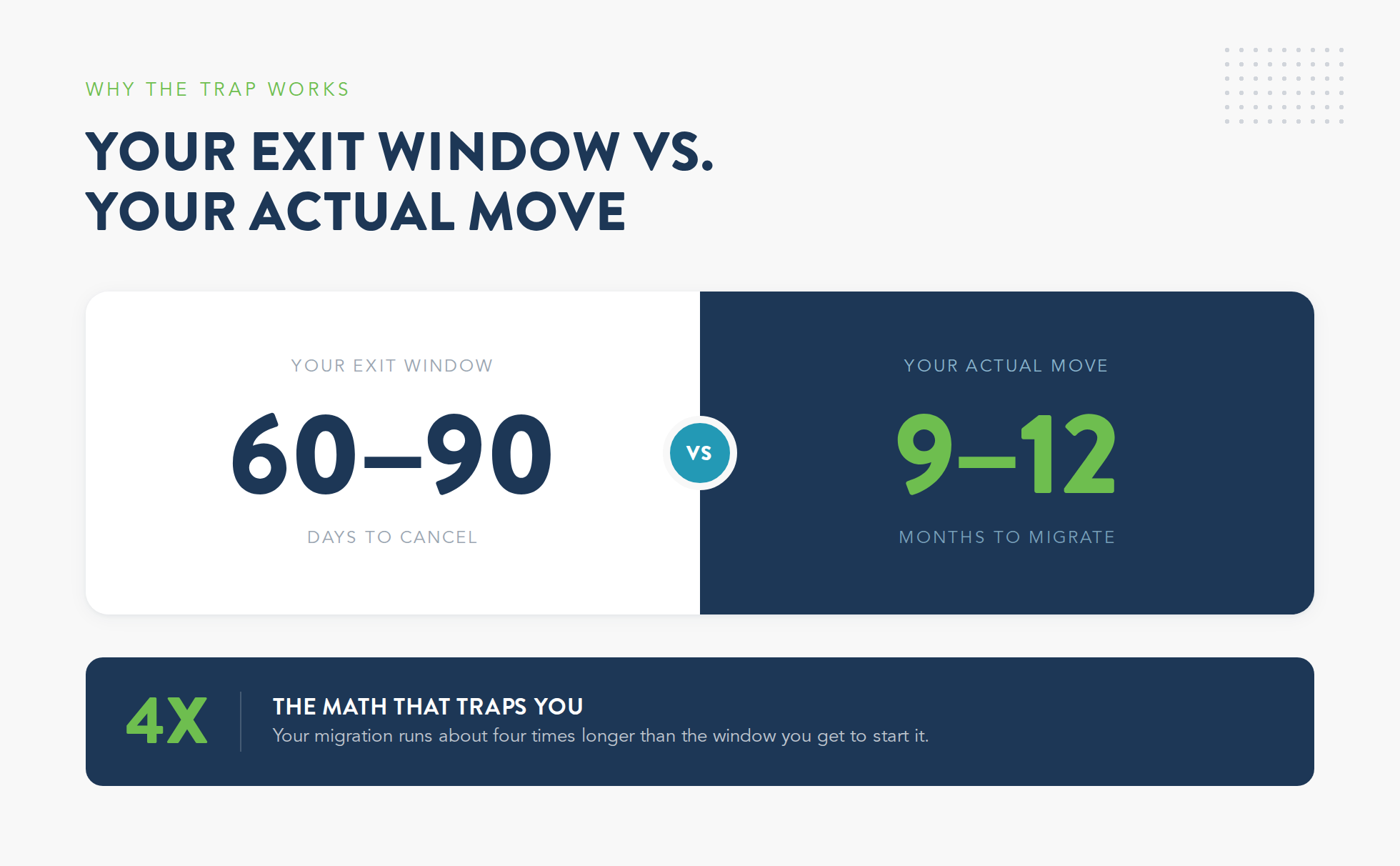
1. The move takes 9 to 12 months, not 9 to 12 weeks.
It's understandable to be hesitant about switching your PSA software. It touches almost everything you run from ticketing, time tracking, contracts, client records, your RMM, documentation, and accounting. And that's exactly why the transition can't happen fast if you want it done right.
- Independent estimates put the core migration of billing, ticketing, and workflows at three to six months.
- Experienced MSPs say to start planning six to nine months out.
- Add evaluation up front and a parallel billing run at the end, and you're at 9 to 12 months start to finish.
That's three quarters of a year from the day you decide to the day you're fully live.
2. Your exit window is only 60 to 90 days, and it has to be in writing.
While the full PSA migration takes upwards of a year, the door out is open for a couple of months at most, and the rules are stricter than people expect:
PSA contracts are full of legal jargon, and somewhere in yours is a termination notice clause you have to follow before the renewal date:
- Most agreements require written notice 60 to 90 days before your renewal date.
- ConnectWise's own terms set the floor at 60 days' notice.
- An informal email won't cut it, since the cancellation usually has to be a signed agreement.
You don't need to know it by heart. You just need to be familiar with your own contract so the date doesn't slip past you.
3. Auto-renewal closes the window for you, so doing nothing means signing again.
Auto-renewal is what turns a missed date into another year on the same platform. It happens quietly, without anyone making you sign a thing:
- The renewal reminder rarely comes from your rep, so the date slips by unnoticed.
- Miss it by a day and you roll into a full new term, price increase included.
- By then the next chance to leave is another year away.
That's how an owner who fully means to switch ends up signing three years in a row.
How much trouble that trap is for you comes down to one number you can find in your contract today: how far away your next renewal is.
Start Evaluating Before the Pain Peaks: A Timeline by Renewal Distance
There's no single right time to start looking at PSA software, because the right time depends on where your current contract sits today. The further out your renewal, the more calmly you can evaluate, negotiate, and move. The closer it is, the more you're forced to compress a year of work into a few months or just accept that you're signing again. Three situations cover almost every MSP, so find the one you're in.
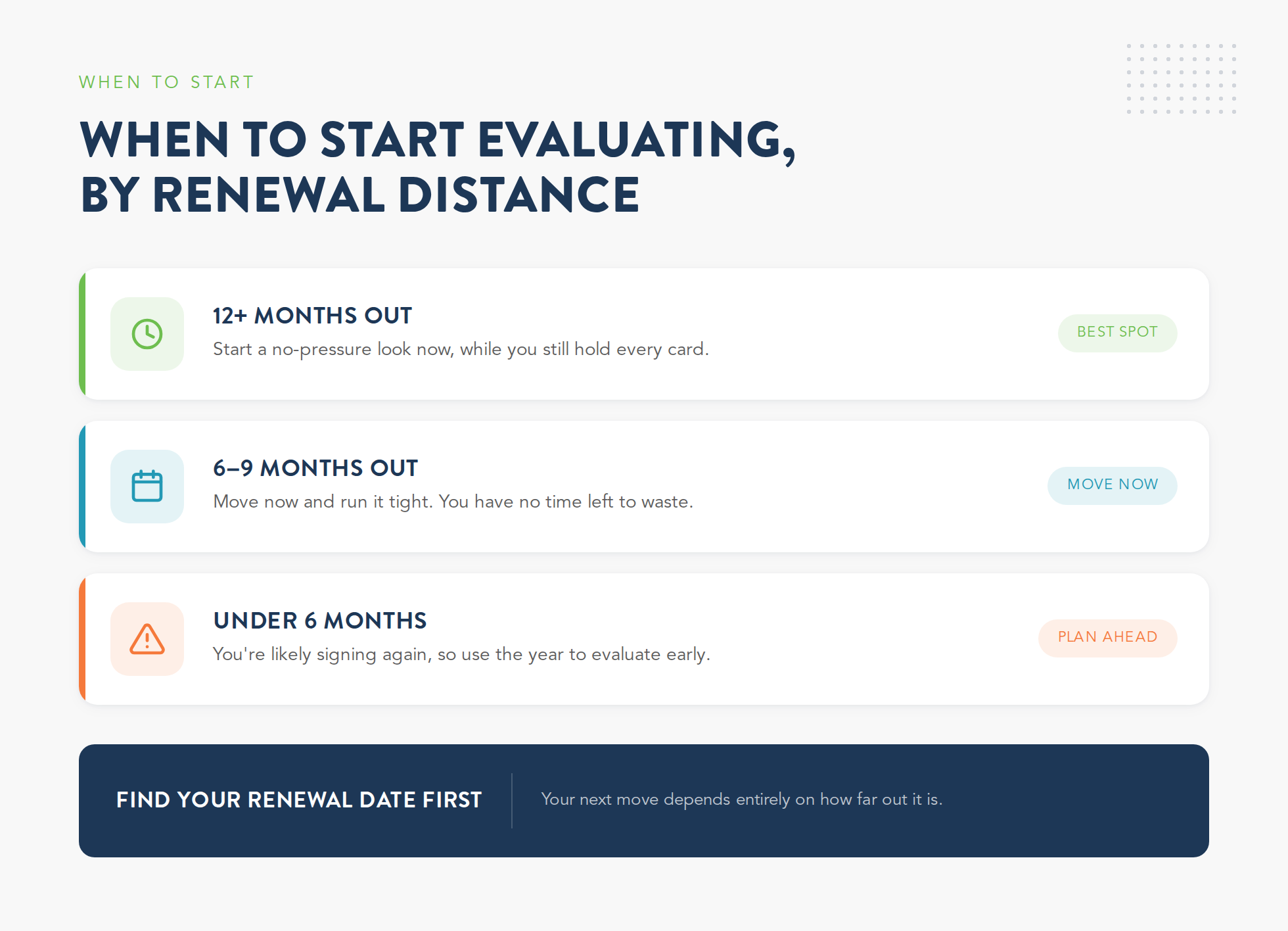
It comes down to three scenarios:
1. Renewal is 12+ months out: start a low-stakes look now, while you still hold every card.
If your renewal is more than a year away and you've had real pain in the last six months, this is the best spot to be in. You're not committing to anything yet. You're just looking, with plenty of time to do it right:
- Run one or two demos and get real, all-in pricing in writing.
- Talk to MSPs who already moved off your current platform.
- Map what a migration would actually involve for your stack.
By the time your cancellation window opens, you'll already know whether you're staying or going. And walking into a renewal with a real alternative in hand is the one thing that gives you leverage on price.
2. Renewal is 6 to 9 months out: move now, because you're already compressed.
You can still make a clean switch from here, but you have no time to waste. Every week you spend deciding whether to start is a week off the back end of the migration. Start this week and run it tight:
- Shortlist two or three platforms in the first two weeks, not the first two months.
- Prioritize vendors with a proven migration track record and dedicated onboarding.
- Put your cancellation notice date on a calendar with a 30-day warning before it.
Plenty of MSPs have moved on this timeline. It just means treating the evaluation like a project with a deadline.
3. Renewal is under 6 months out: you're probably signing again, so use the year you're about to buy.
If your renewal is less than six months out and you haven't started, be honest with yourself. There isn't enough time to evaluate and migrate cleanly before the window closes, so plan to make that next year count:
- Sign the renewal, but negotiate hard using whatever leverage you have.
- Put your next cancellation date on the calendar the day you sign.
- Start a real evaluation in the first quarter of the new term, not the last.
Use the year you just bought to run the evaluation you didn't have time for. That way the next renewal is a decision you make, not one that happens to you.
Timing tells you when to start. It doesn't tell you what to do once you're in the evaluation, and a sloppy evaluation can waste even a generous head start. So here's the method.
How to Evaluate PSA Software in 5 Steps Before Your Renewal Window Closes
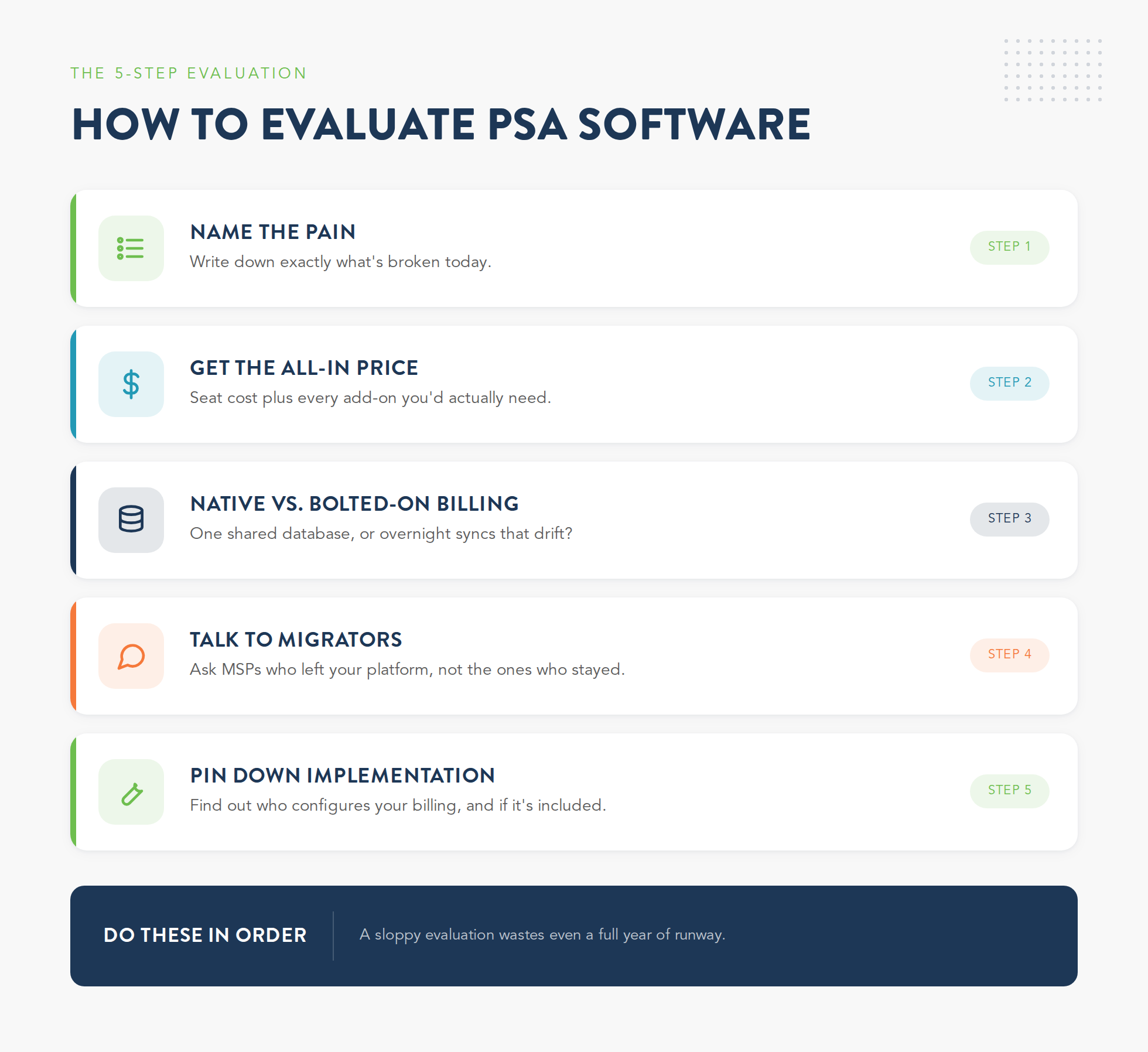
Most PSA evaluations go wrong the same way. You book a few demos, watch each vendor run their own software through a flawless pitch, get impressed by the polished parts, and pick based on a gut feeling. Then the billing setup falls apart in month four because nobody asked the hard questions up front. The steps to evaluating PSA software aren't complicated, but they have to happen in order, and they have to dig past the demo.
Step 1: Write down the pain you're actually trying to fix
Before you look at a single platform, get specific about what's broken today. Vague goals like "better billing" lead to vague evaluations. Name the real problems so you can test every vendor against them:
- The exact billing scenarios your current PSA gets wrong.
- The reports you can't pull without exporting to a spreadsheet.
- The manual steps your techs repeat every day just to feed the system.
This list becomes your scorecard. If a platform can't fix the things on it, the demo doesn't matter.
Step 2: Get the all-in price, not the seat price, because the add-ons are where the cost hides.
The number on the quote is almost never what you'll pay. Legacy platforms look affordable on the seat price, then you find out billing, payments, and reporting are separate modules or third-party bolt-ons. MSPs report spending $500 to $900 a month on the add-ons it takes to make a legacy PSA do what they assumed it did out of the box. Get the real number before you compare anything:
- The base seat or per-tech cost.
- Every required add-on for billing, payments, and reporting.
- Setup and implementation fees, both one-time and ongoing.
Price the platform on seat cost plus everything you'll buy to make it work. That gap is the part vendors hope you won't add up.
Step 3: Check whether billing is native or bolted on
This is the single most important technical question, and it's the one demos skip. Ask whether the billing engine shares one database with ticketing and contracts, or whether it's a separate module stitched in through an integration. The answer tells you whether your invoices will ever match reality without manual work:
- Native billing pulls ticket time, contracts, and usage from the same system, so invoices build themselves.
- Bolted-on billing relies on overnight syncs that drift, which means someone reconciles by hand.
- The gap shows up worst when you add usage-based or telecom charges that a flat-rate billing module was never built to handle.
If billing is an afterthought in the architecture, it'll be an afterthought in your month-end close, every single month.
Step 4: Talk to MSPs who migrated off your platform, not the ones who never left.
Reference calls with happy current customers tell you what people like. They don't tell you what breaks. The more useful conversation is with MSPs who recently moved from your exact platform to the one you're considering, because they've seen both sides:
- Ask how long the migration actually took versus what the vendor promised.
- Ask what broke during cutover and how the new vendor handled it.
- Ask what they'd do differently if they started over.
Current customers sell you the dream. Migrators tell you the truth. You want both, but weight the migrators more.
Step 5: Find out exactly what "implementation" includes
When a vendor says implementation is included, pin down what that actually covers. On most platforms, the ticketing setup is the easy part and the billing configuration is a separate engagement or left entirely to you. That's the piece that drags migrations past their deadline:
- Confirm whether billing configuration is part of implementation or billed separately.
- Ask who builds your contract and rate logic, you or them.
- Get the realistic timeline for billing setup specifically, not the whole project.
Billing configuration takes twice as long as ticketing because it needs accounting input, contract logic, and testing against real client data. If nobody owns it, it becomes your problem at the worst possible time.
Those are the steps to evaluating PSA software that hold up once a real migration starts. The demos themselves are still where most evaluations get steered off course, so it's worth knowing which questions cut through the pitch.
What Questions Should You Ask Before Switching PSA Software?
Every PSA demo is a sales presentation dressed as a product tour. The vendor controls the data, the workflow, and the pace, and they steer you toward the features that look best. The questions that actually reveal a platform are usually the ones that aren't on the agenda. Here are five that cut deeper than "can you show me the ticketing view," and what a weak answer to each one sounds like.
Notice the pattern. The questions that matter force a specific, checkable answer. The ones vendors love let them talk about vision instead of mechanics. Push on the specifics, and write the answers down, because you'll be comparing them against three other vendors in a month.
That last question, how fast a platform actually ships, matters more than it sounds, because the PSA you pick has to keep up with where your business is going, not just where it is today.
How to Evaluate PSA Software Against Where Your Business Is Headed
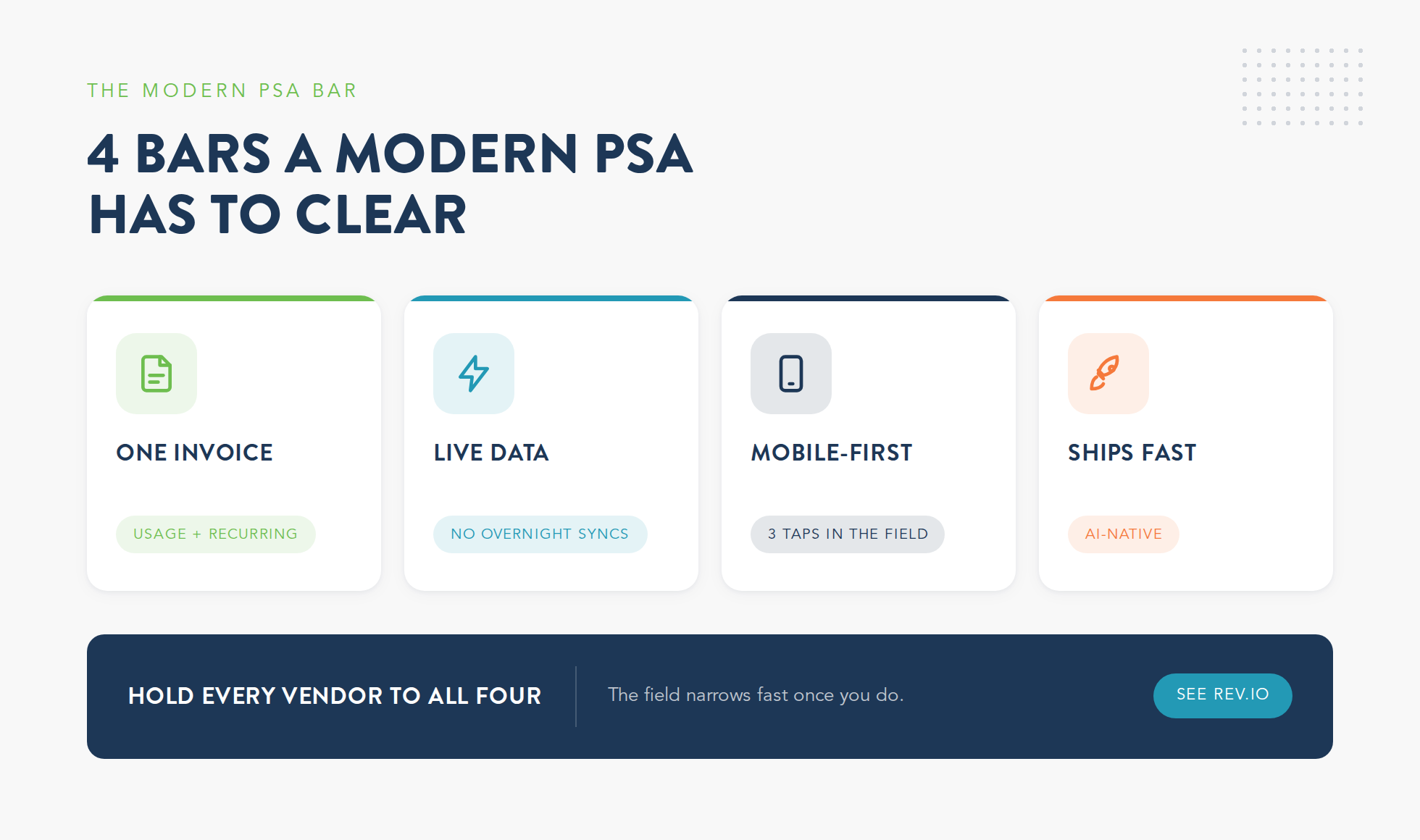
The most expensive evaluation mistake is picking a platform that fits the MSP you are today but can't stretch to the one you're becoming. Most MSPs aren't standing still. They're adding voice, taking on usage-based services, or moving into security, and a PSA that only handles flat-rate managed IT billing quietly becomes the ceiling on all of it. So evaluate against your roadmap, not just your current invoice. A modern PSA has to clear four bars to keep up.
1. It bills usage and recurring revenue on one invoice
The day you sign your first voice or connectivity client, flat-rate billing stops being enough. Usage-based charges and recurring monthly revenue have to land on the same invoice, or you're back to reconciling two systems by hand. A platform that can't model both is a platform you'll outgrow the moment you diversify.
2. Its data is live, not synced overnight
When device counts, ticket time, and contract changes flow in real time, your invoices match reality without a monthly cleanup. When the systems only sync overnight, the numbers drift, and someone spends a piece of every month making them line up. Live data is the difference between billing that runs itself and billing that needs a babysitter.
3. It works on a phone
Your technicians aren't sitting at a desk feeding the PSA. They're on-site, and if logging time or updating a ticket takes ten taps and a desktop, it doesn't get done until later, if at all. A PSA built mobile-first captures the billable work as it happens, which means fewer lost hours and cleaner data.
4. It ships new features fast
This is the bar most legacy platforms fail. Many PSAs were built more than a decade ago and have been bolting features onto the same aging core ever since, which makes every update slow and every gap permanent. Newer, AI-native platforms use AI inside their own development to ship improvements at a pace the old vendors can't match. When you evaluate, ask what shipped in the last quarter, because a platform that has barely changed in two years is the platform you'll be frustrated with in two more.
Hold a vendor to all four bars and the field narrows fast. Rev.io clears them by design: an AI-native PSA that bills usage and recurring revenue on one invoice, runs on live data instead of overnight syncs, and gets new capability shipped quickly because AI is built into how the platform itself is developed.
The platform you pick caps where the business can go for the next several years, and you don't get to redo that choice on a whim. So the worst possible time to evaluate is the one your renewal date forces on you.
Conclusion: The PSA Renewal Trap Only Works If You Wait
The PSA renewal trap isn't really about contracts. It's about timing. The pain builds all year, the window to act is short, and the move takes longer than the window allows, so you sign again and tell yourself next time will be different. The MSPs who break the loop don't wait for the pain to become unbearable. They treat the evaluation timeline as seriously as the migration, start looking long before they think they need to, and walk into every renewal with a real alternative in hand.
When you're ready to actually look, Rev.io gives MSPs a single platform where PSA, billing, and payments share one system, so usage and recurring revenue land on one invoice and your month-end stops being a manual job. No bolted-on billing module, no overnight syncs, no second system to reconcile. See how it fits your operation before your next renewal date does it for you. Request a demo.