Most PSA vendors will tell you their platform "supports field service." What that usually means is their ticketing system works on a laptop and the mobile app technically loads on a phone.
Most PSA vendors will tell you their platform "supports field service." What that usually means is their ticketing system works on a laptop and the mobile app technically loads on a phone.
That's a far cry from what field service actually looks like.
A field service technician drives 45 minutes to a client site. He grabs parts from the van, installs hardware in a server room with no WiFi, tracks time against a contract, scans serial numbers on everything he touched, and routes to the next job before lunch. That's a full operational workflow, and most PSAs weren't designed to support it.
The gap between what vendors promise and what actually holds up in the field shows up in your revenue every day. Missed billable time, manual reconciliation, dispatch decisions made on bad data.
We talk to MSPs every day. Different company sizes, different markets, different levels of technical maturity. But when the conversation turns to field service, the same frustrations come up over and over again.
This post covers the five PSA features field service technicians ask for most consistently. You'll also get a scorecard at the end to see whether your current PSA is actually built for field service, or just adapted for it.
After 624 Recent Calls with MSPs: Here's the Top 5 Field Technician Software Features They Actually Wanted
The five features below aren't wishlist items. They're the field technician software capabilities MSPs brought up over and over again, across different company sizes, different markets, and different levels of technical maturity. Some of these shops were running five techs. Some were running fifty. The requests were almost identical.
Here's what came up most, and how many times it showed up in the data.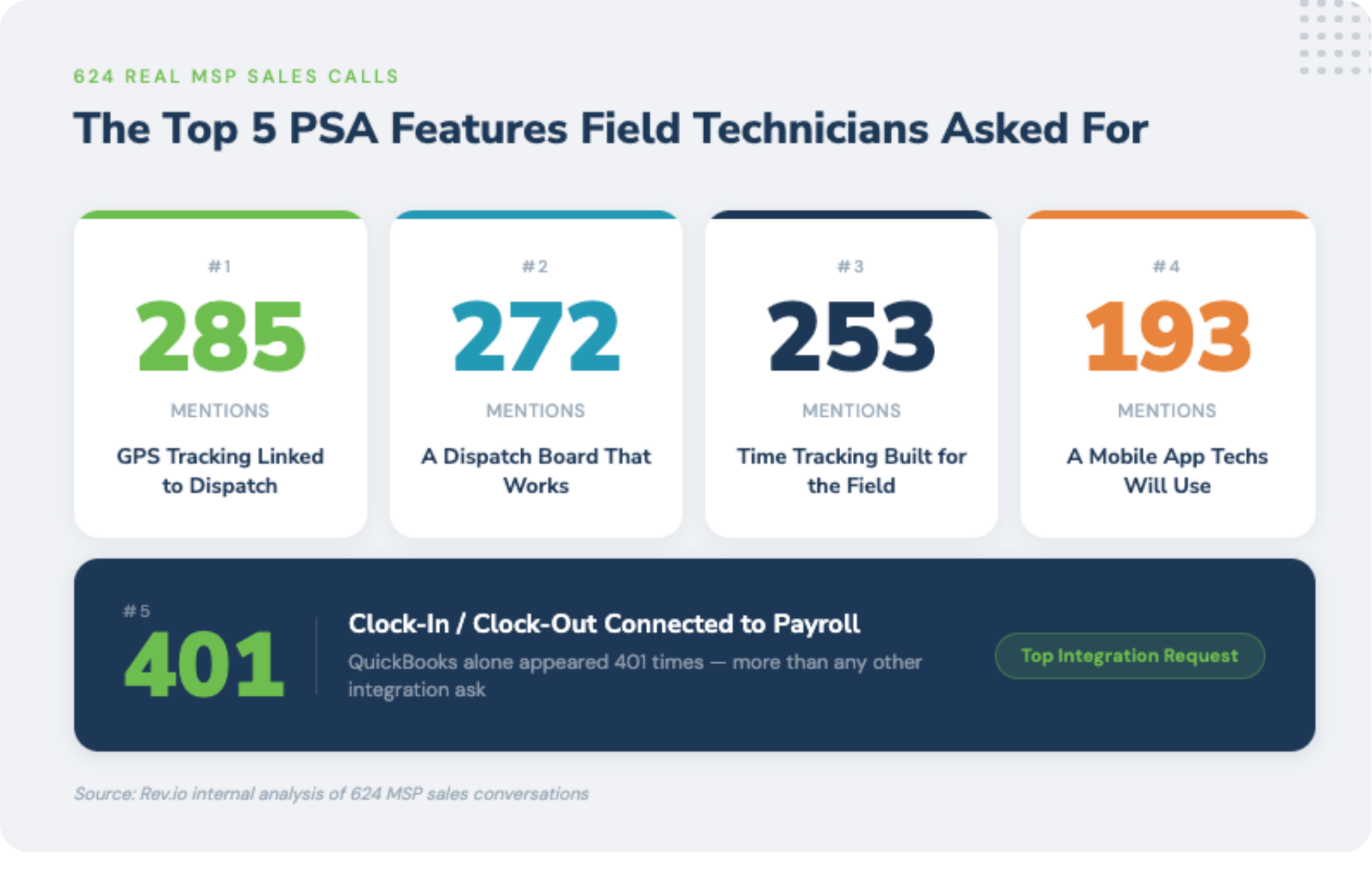
#1: GPS Tracking Linked to Dispatch
GPS came up on nearly 50% of the calls, making it the single most-requested PSA field service feature in our dataset. When we probed what people meant, the answers were specific and operational.
This isn't about surveillance. MSP owners aren't trying to micromanage their techs. They're trying to solve concrete problems that their current tools don't address:
- Dispatch optimization: "I want to know who's closest to the next job before I send someone across town." Real-time location data turns dispatch decisions from schedule-based assumptions into live routing.
- Van and equipment location: "I need to know which truck has the inventory for this job before I dispatch it." When inventory lives in vehicles, knowing where the vehicles are is inseparable from knowing where the parts are.
- Proof of service: "I need to show a client that a tech was on-site for three hours, not 45 minutes." Billing disputes are real. GPS provides an objective record that protects the MSP.
- Dispatch optimization: "I want to know who's closest to the next job before I send someone across town." Real-time location data turns dispatch decisions from schedule-based assumptions into live routing.
- Route accountability: For MSPs in security, healthcare, or government verticals, a GPS-verifiable record of who visited which site, when, and for how long is often a compliance or contractual requirement, not a preference.
The MSPs asking for GPS in our calls weren't asking for a monitoring product. They were asking for operational intelligence: a live view of their field team that connects to dispatch, scheduling, and billing in a single workflow.
Rev.io's dispatch board links field location data directly to ticket and scheduling workflows. When a tech arrives on-site, the job clock can start automatically. When they leave, it stops. The data trail runs from dispatch decision to invoice, no human intermediation required.
✅ Quick Check: Ask your dispatcher how they know where each tech is right now without sending a text. If the answer involves any manual step, your PSA field service features have a GPS gap.
#2: A Dispatch Board That Actually Works
"Dispatch board" came up 272 times, and the frustration underneath it was almost always the same. The current dispatch experience is either a whiteboard, a shared calendar, or a basic drag-and-drop screen that knows nothing about the techs it's scheduling.
What field service technicians are asking for when they say "a dispatch board that actually works" is a consistent set of capabilities that most current tools don't deliver together:
- Live tech availability, not just scheduled availability: A tech might be scheduled for a job, but if that job ran long, their scheduled availability is fiction. A real MSP dispatch board GPS integration knows where techs actually are, not just where they're supposed to be.
- Skills-based routing: Not every tech can handle every job. A dispatch board that knows which techs are certified for which types of work, and routes accordingly, prevents the embarrassment of sending the wrong person to a specialized job.
- Integration with time and billing: When a job is dispatched and completed, that completion should trigger the billing cycle, not create a separate step someone has to remember to take. The dispatch board is the starting point of the revenue cycle.
- Mobile visibility: The dispatch manager needs to see the board from anywhere. Techs need to see their assignments from the field. A dispatch board that only lives on a desktop in the office is half a dispatch board.
- SLA awareness: Priority jobs should surface visually, and the board should flag SLA violations before they happen, not after.
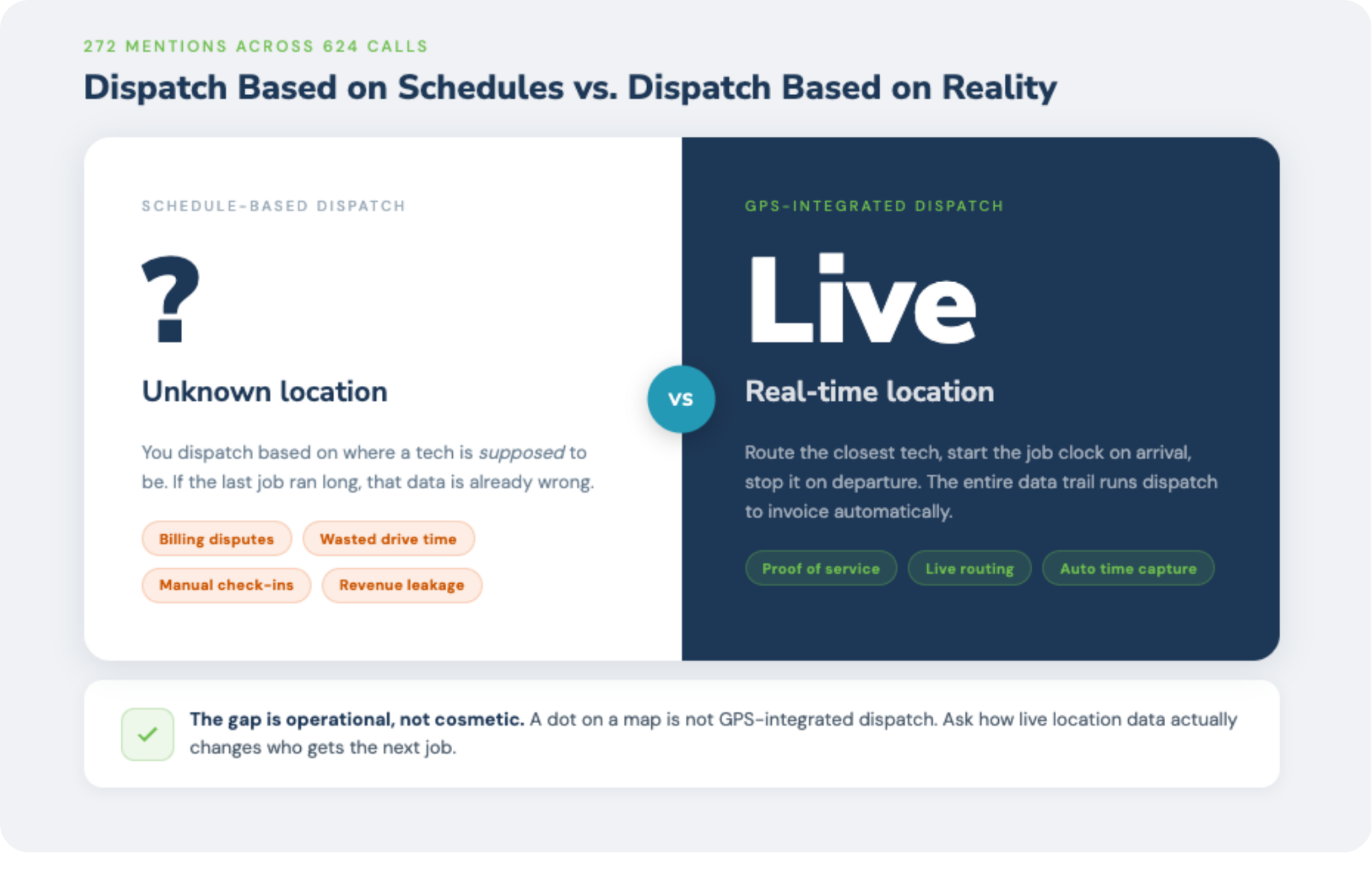
The most common dispatch complaint across our call data was the disconnect between what the board showed and what was actually happening in the field. That disconnect between schedule and reality is exactly what GPS-integrated dispatch solves.
✅ Quick Check: Open your dispatch board right now and count how many data points it shows you about each tech's current status. If the answer is "just their schedule," you're flying blind.
#3: Time Tracking That Works in the Field
Time tracking came up 253 times. For most IT MSPs, billable hours are the revenue. If time isn't tracked accurately, revenue isn't captured accurately. It's that simple, and the MSPs in our dataset knew it.
The gap between "we have time tracking" and "our time tracking actually works" is enormous in field service contexts. Here's what MSPs told us they actually need:
- Offline functionality: A tech in a server room with no WiFi or in a rural building with spotty cell service can't be dependent on a cloud-based timer. The MSP mobile app needs to log locally and sync when connectivity returns.
- Tied to the ticket, not just the clock: "I worked 2 hours on Tuesday" is not billable data. "I worked 2.25 hours on Ticket #4471 for client Kazar Security under their managed services contract" is billable data. The distinction matters for billing accuracy, SLA tracking, and profitability analysis by client.
- Automatic start when possible: If a tech checks into a job via GPS or opens a remote session from the field, the timer should start. Manual timer management adds friction, and friction means time doesn't get logged.
- After-hours and travel time rules: Contracts often have different billing rates for after-hours work, emergency calls, or travel time. The time tracking system needs to know those rules and apply them automatically.
- Direct feed to billing: Time logged on a ticket should flow directly into the billing cycle. If someone has to manually review and approve every time entry before it hits an invoice, you have both a bottleneck and a revenue leak.
Modern PSAs are beginning to auto-populate time based on activity context: open sessions, ticket interactions, location check-ins. This is the direction the market is moving, and the MSPs in our call data were already asking for it.
✅ Quick Check: Pull the last 20 time entries from your field techs. How many were logged the same day the work happened? If the answer is less than 80%, you're losing billable time to memory-based logging.
#4: An MSP Mobile App Techs Will Actually Use
193 mentions, and what's notable is how the request was framed. MSPs weren't asking "does it have a mobile app?" They were asking: "Is it an app techs will actually use?"
That's a different question. And the answer for most current PSA mobile apps is: probably not.
The typical PSA mobile app is a compressed version of the desktop experience, a web app wrapped in a native shell, or a limited subset of features ported over as an afterthought. The UX is designed for someone sitting at a desk, not for someone standing in a server room with one hand free.
What field techs actually need from a PSA mobile app:
- Offline functionality: No cell service is a field reality. The app needs to work without it and sync when connectivity returns.
- Fast ticket access and update: A tech should be able to pull up a ticket, read client history, log what they did, and close the job in under 2 minutes on a phone. If it takes longer, they won't do it consistently.
- Photo and document capture: Before-and-after photos, installation photos, client signatures. These should be capturable from the field and auto-attached to the ticket. This protects the MSP in disputes and creates a professional service record.
- Inventory scanning: Serial number scanning from the phone camera, tied to the ticket and inventory system. No separate scanner hardware required.
- Push notifications for dispatch changes: When the dispatch board updates (new job assigned, priority change, client notes added), the tech's phone should know immediately.
- Clock-in/clock-out: Geofenced job start and end logging, visible to dispatch in real time.
The MSPs asking for this in our call data weren't asking for a feature. They were asking for a professional tool their techs would respect and use daily, one that matches the quality of every other app those techs carry on their phones.
✅ Quick Check: Hand your phone to a field tech and ask them to close a ticket on your current PSA mobile app. Time how long it takes. If it's over 3 minutes, or if they ask for help at any point, the UX isn't built for the field.
#5: Clock-In/Clock-Out That Connects to Payroll
MSP owners with hourly field techs are managing two separate time-tracking needs: billable time for clients and labor hours for payroll. Most PSAs serve one or the other, not both.
The result is predictable. Techs log time in the PSA for billing, and log time in a separate payroll system (or on paper, or in a spreadsheet) for payroll. Double-entry is the norm. Reconciliation is manual. Errors in one system don't automatically flag in the other.
What MSPs are asking for:
- Unified time capture: Clock in at job start, clock out at completion. One record, visible to both billing (PSA) and payroll (QuickBooks, Gusto, ADP, or similar) via integration.
- Overtime and scheduling rules applied automatically: If a tech works more than 8 hours in a day or 40 hours in a week, the payroll integration should flag it, not require a manager to notice.
- Geofenced clock-in verification: The clock-in should verify the tech is at the job site, not across town.
- Separation of billable vs. non-billable time: Training time, drive time, administrative work are legitimate labor hours but may not be billable. The system should support both categories without confusion.
The QuickBooks integration angle is significant. QuickBooks appeared 401 times in our call data, more than any other integration request. MSPs aren't trying to replace QuickBooks with their PSA's billing system. They're trying to connect the two so that time data flows from the field, through the PSA, and into QuickBooks without human intervention at each handoff.
✅ Quick Check: Ask your ops manager how many manual steps exist between a tech clocking out of a job and that time appearing in your payroll system. More than one is a double-entry problem waiting to create a payroll error.
What the Data Tells Us About the Future of Field Service MSPs
Six hundred calls paint a clear picture: field service technicians are underserved by the current PSA market, and they know it.
The platforms that dominated the PSA space were built for the service desk workflow: ticketing, time logging, project management, client communication. They were built for MSPs whose primary service delivery model is remote. For MSPs with boots on the ground, those platforms were adapted rather than designed.
The gap is closing. The MSP software landscape is increasingly focused on PSA field service features: GPS-integrated dispatch, serialized inventory, mobile-first workflows, payroll-connected time tracking. The MSPs who figure out which platforms are genuinely built for field service techs, versus which ones have bolted on a few features to check a box, will have a significant operational advantage.
Here's what to look for in the best PSA software for field technicians:
- The mobile app should be demonstrated, not just shown on a slide: Watch a real tech workflow on a real phone, start to finish.
- GPS should connect to dispatch, not just display on a map: Ask how GPS data affects routing decisions in real time.
- Inventory tracking should be serialized: Generic quantity tracking is not the same as serialized inventory with audit trails.
- Time tracking should flow to billing automatically: Ask how many manual steps exist between a closed job and a sent invoice.
- The payroll integration should be native, not a workaround: Ask which payroll systems are supported, and watch a live demo of the time-to-payroll workflow.
The field is where your revenue is earned. It should be where your systems are built from. Choosing the best PSA for field technicians means choosing one that was designed for field realities, not retrofitted for them.
Field Tech PSA Scorecard: Rate Your Current Stack on the Top 10 Field Requests
Most PSA platforms claim to support field technicians. What that usually means is the ticketing system works on a phone and the mobile app technically loads without crashing.
That's not the same as being built for the field.
This 10-question scorecard rates your current stack and gives a plain-English read on where your gaps are and what to do about them.
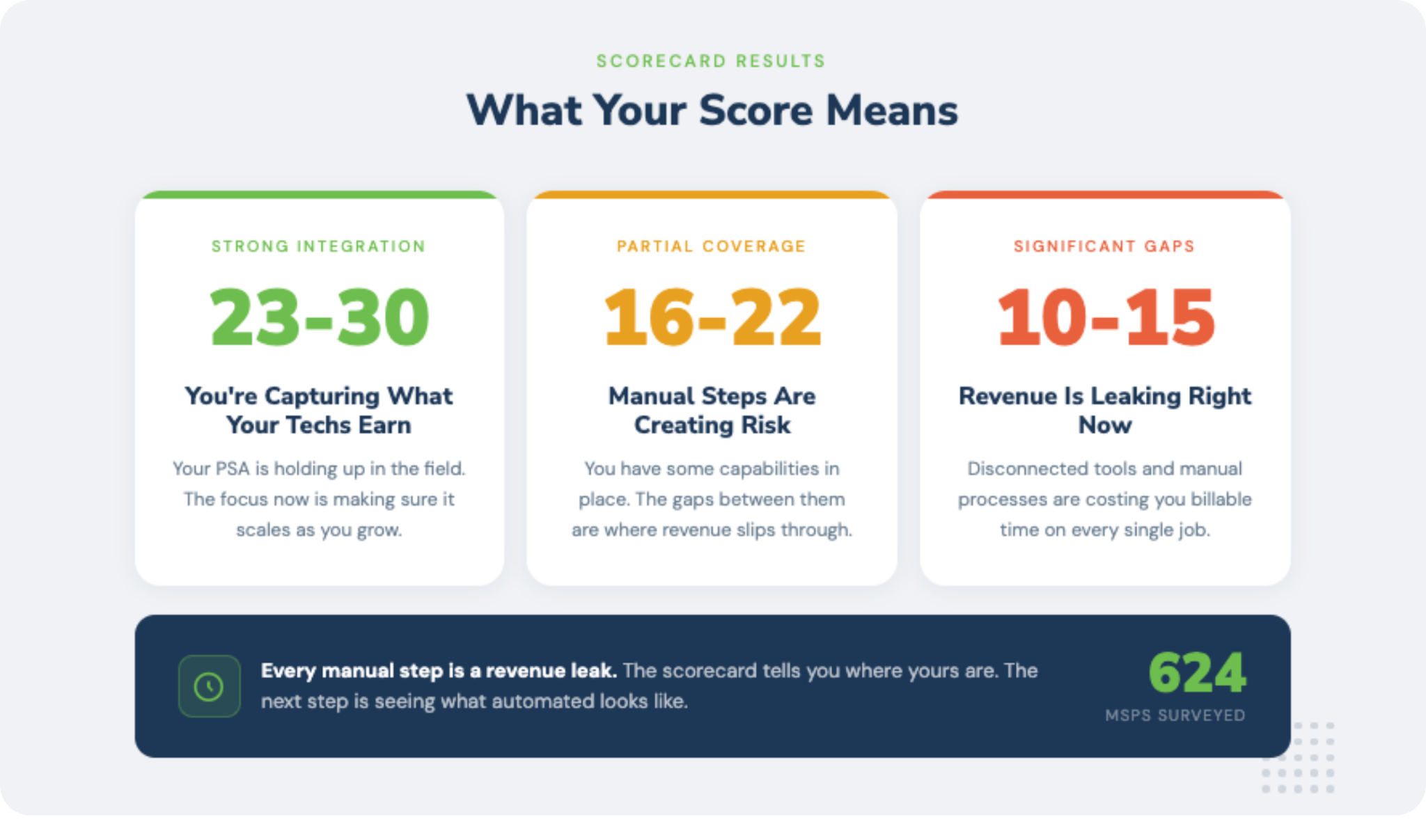
Score each item 1–3: 1 = doesn't exist, 2 = partial or manual, 3 = fully automated.
Score interpretation:
- 10–15: Significant field service gaps. Revenue is likely leaking.
- 16–22: Partial field service support. Manual steps are creating risk.
- 23–30: Strong field service integration. You're capturing most of what you're earning.
Conclusion: Built From What MSPs Actually Said
Field service MSPs have been running on PSAs built for someone else. The service desk got ticketing, SLA tracking, and remote session management. Field techs got a mobile app that technically loads and a dispatch board that doesn't know where anyone actually is.
The five features in this post came up consistently across every type of MSP we talk to. Small shops, large shops, different verticals. The requests are the same because the problem is the same: the tools don't match the work.
Rev.io was designed the other way around — field-first, with the workflows your techs actually live in. See it working on your real jobs and routes.